This adds an option to set the split direction for both the horizontal
splits, and the vertical splits.
A couple of things to look for when reviewing:
* The `derive` keywords on the Enums were copy pasted, no clue what they
should be
* Tried adding tests for this, but got stuck.
Co-authored with @Tobbe
Fixes: https://github.com/zed-industries/zed/issues/11342
This PR can improve the UX when dropping a file that cannot be opened
into the workspace pane. Previously, nothing happened without any
messages when such error occurred, which could be awkward for users.
Additionally the pane was being split even though the file failed to
open.
Here's a screen recording demonstrating the previous/updated behavior:
https://github.com/user-attachments/assets/cfdf3488-9464-4568-b16a-9b87718bd729
Changes:
- It now displays an error message if a file cannot be opened.
- Updated the logic to first try to open the file. The pane splits only
if the file opening process is successful.
Release Notes:
- Improved error handling when opening files in the workspace pane. An
error message will now be displayed if the file cannot be opened.
- Fixed an issue where unnecessary pane splitting occurred when a file
fails to open.
This fixes a weird bug:
1. Use `/workflow` in assistant
2. Have it generate a step that modifies a file
3. Either (a) select the step in the assistant and have it auto-insert
newlines (b) select "Transform" to have the step applied
4. Close the modified file in the editor ("Discard")
5. Re-open the file
6. BUG: the changes made by assistant are still there!
The reason for the bug is that the assistant keeps references to buffers
and they're not closed/reloaded when closed/reopened.
To fix the bug we now rollback the applied workflow steps when
discarding a buffer.
(This does *not* yet fix the issue where a workflow step inserts a new
buffer into the project/worktree that does not show up on the file
system yet but in `/file` and hangs around until Zed is closed.)
Release Notes:

- N/A
Co-authored-by: Bennet <bennet@zed.dev>
For future reference: WIP branch of copy/pasting a mixture of images and
text: https://github.com/zed-industries/zed/tree/copy-paste-images -
we'll come back to that one after landing this one.
Release Notes:
- You can now paste images into the Assistant Panel to include them as
context. Currently works only on Mac, and with Anthropic models. Future
support is planned for more models, operating systems, and image
clipboard operations.
---------
Co-authored-by: Antonio <antonio@zed.dev>
Co-authored-by: Mikayla <mikayla@zed.dev>
Co-authored-by: Jason <jason@zed.dev>
Co-authored-by: Kyle <kylek@zed.dev>
Closes https://github.com/zed-industries/zed/issues/16042
This commit modifies the behavior of inline transformations to only
accept finished transformations when the user manually saves the file.
Previously, transformations were automatically accepted on any save
event, including autosaves.
This was achieved by updating the `Pane` and `Workspace` structs to emit
a new `UserSavedItem` event when a manual save occurs, and modifying the
`InlineAssistant` to register and handle this new event (instead of
`editor::Saved`).
Release Notes:

- N/A
This PR opens workflow step editors as preview tabs and closes them upon
exiting the step if they are still in preview mode and they weren't
already open before entering the step.

Making this work was tricky, because we often edit the buffer as part of
displaying the workflow step suggestions to create empty lines where we
can generate. We undo these edits if the transformation is not applied,
but they were causing the preview to be dismissed.

After trying a few approaches, I decided to give workspace `Item`s a
`preserve_preview` method that defaults to false. When the workspace
sees an edit event for the item, it checks if the item wants to preserve
its preview. For buffers, after editing, you can call `refresh_preview`,
which sets a preview version to the current version of the buffer. Any
edits after this version will cause preview to not be preserved.

One final issue is with async auto-indent. To ensure these async edits
don't dismiss the preview, I automatically refresh the preview version
if preview was preserved prior to performing the auto-indent. The
assumption is that these are edits created by other edits, and if we
didn't want to dismiss the preview with the originating edits, then the
auto-indent edits shouldn't dismiss it either.

Release Notes:

- N/A

---------

Co-authored-by: Jason <jason@zed.dev>
This commit gives tab button renderers control over the condition in
which they should be displayed. Previously we displayed tab buttons only
when the pane was focused. Now tab renderers can return an Option of
AnyElement, which in turn makes it possible for them to control when and
how they're rendered. Pane and Terminal handlers still check for self
focus condition and Assistant Panel does not.


Release Notes:

- N/A
This PR renames and added a new pane event to indicate the difference
between `removing` and `removed` event. This change is needed for the
debugger implementation, if you close a pane we have to send a
`terminateThread` request to the adapter because it's not supported to
reopen a pane. So when the pane is removing we have to know what thread
it is what is stored on the panel itself, so we have to be able to get
this information before the pane is actually removed.

So my idea how to fix this was by adding a new event called
`RemovedItem` which is a rename of `RemoveItem` which also makes a bit
more sense because the item is removed at that point. And seeing the
name `RemoveItem` does not really say that it's removed, more like we
are removing the item.

/cc @mikayla-maki

Release Notes:

- N/A
This PR reworks the rendering for tab icons to allow us to render all of
the tab icons—not just file icons—in the tab's start slot.
The `Item` trait now has a separate `tab_icon` method that can be used
to indicate what icon should be shown for the tab.
Release Notes:

- N/A
This adds the ability for Zed to restore unsaved buffers on restart. The
user is no longer prompted to save/discard/cancel when trying to close a
Zed window with dirty buffers in it. Instead those dirty buffers are
stored and restored on restart.

It does this by saving the contents of dirty buffers to the internal
SQLite database in which Zed stores other data too. On restart, if there
are dirty buffers in the database, they are restored.

On certain events (buffer changed, file saved, ...) Zed will serialize
these buffers, throttled to a 100ms, so that we don't overload the
machine by saving on every keystroke. When Zed quits, it waits until all
the buffers are serialized.


### Current limitations
- It does not persist undo-history (right now we don't persist/restore
undo-history regardless of dirty buffers or not)
- It does not restore buffers in windows without projects/worktrees.
Example: if you open a new window with `cmd-shift-n` and type something
in a buffer, this will _not_ be stored and you will be asked whether to
save/discard on quit. In the future, we want to fix this by also
restoring windows without projects/worktrees.

### Demo


https://github.com/user-attachments/assets/45c63237-8848-471f-8575-ac05496bba19


### Related tickets

I'm unsure about closing them, without also fixing the 2nd limitation:
restoring of worktree-less windows. So let's wait until that.

- https://github.com/zed-industries/zed/issues/4985
- https://github.com/zed-industries/zed/issues/4683

### Note on performance

- Serializing editing buffer (asynchronously on background thread) with
500k lines takes ~200ms on M3 Max. That's an extreme case and that
performance seems acceptable.

Release Notes:

- Added automatic restoring of unsaved buffers. Zed can now be closed
even if there are unsaved changes in buffers. One current limitation is
that this only works when having projects open, not single files or
empty windows with unsaved buffers. The feature can be turned off by
setting `{"session": {"restore_unsaved_buffers": false}}`.

---------

Co-authored-by: Bennet <bennet@zed.dev>
Co-authored-by: Antonio <antonio@zed.dev>
### TODO

- [x] Make sure keybinding shows up in pane + menu
- [x] Selection tool in the editor toolbar
- [x] Application Menu
- [x] Add more options to pane + menu
   - Go to File...
  - Go to Symbol in Project...
- [x] Add go items to the selection tool in the editor:
   - Go to Symbol in Editor...
   - Go to Line/Column...
   - Next Problem
   - Previous Problem
- [x] Fix a bug where modals opened from a context menu aren't focused
correclty
- [x] Determine if or what needs to be done with project actions:
- Difficulty is that these are exposed in the UI via clicking the
project name in the titlebar or by right clicking the root entry in the
project panel. But they require reading and are two clicks away. Is that
sufficient?
    - Add Folder to Project
    - Open a new project
    - Open recent
 - [x] Get a style pass
 - [x] Implement style pass
   - [x] Fix the wrong actions in the selection menu
   - [x] Show selection tool toggle in the 'editor settings' thing
- [x] Put preferences section from the app menu onto the right hand user
menu
- [x] Add Project menu into app menu to replace 'preferences' section,
and put the rest of the actions there
- [ ] ~~Adopt `...` convention for opening a surface~~ uncertain what
this convention is.
   - [x] Adopt link styling  for webview actions
   - [x] Set lucide hamburger for menu icon
   - [x] Gate application menu to only show on Linux and Windows


Release Notes:

- Added a 'selection and movement' tool to the Editor's toolbar, as well
as controls to toggle it and a setting to remove it (`"toolbar":
{"selections_menu": true/false }`)
- Changed the behavior of the `+` menu in the tab bar to use standard
actions and keybindings. Replaced 'New Center Terminal' with 'New
Terminal', and 'New Search', with the usual 'Deploy Search'. Also added
item-creating actions to this menu.
- Added an 'application' menu to the titlebar to Linux and Windows
builds of Zed
Release Notes:

- Now when an editor loses focus (e.g. from switching tabs) and then
gains focus again, it doesn't close the inline assist. Instead, it only
closes when you move the cursor outside of it, e.g. by clicking
somewhere else in its parent editor.

---------

Co-authored-by: Antonio Scandurra <me@as-cii.com>
Follow up to: https://github.com/zed-industries/zed/pull/10986

However, I have set this to have a default behavior of 'auto': matching
the current platform's conventions, rather than a default value of
'off'.

fixes https://github.com/zed-industries/zed/issues/5322.

Release Notes:

- Changed the behavior of `workspace::CloseActiveItem`: when you're
using macOS and there are no open tabs, it now closes the window
([#5322](https://github.com/zed-industries/zed/issues/5322)). This can
be controlled with a new setting, `when_closing_with_no_tabs`, to
disable it on macOS, or enable it on other platforms.
Implemented autosave functionality with a delay, which now refrains from
formatting the code upon triggering unless the user manually saves it.
Additionally, enhanced documentation for the `format_on_save` setting
has been added. This resolves the issue where autosave with delay would
inadvertently format the code, disrupting the user experience, as
reported in the corresponding issue.

Release Notes:

- Fixed a bug where autosave after_delay would auto-format the buffer
([#9787](https://github.com/zed-industries/zed/issues/9787)).

---------

Co-authored-by: Conrad Irwin <conrad.irwin@gmail.com>
This PR is another step to tabless editing (#6424, #4963). It adds
support for tab bar settings that allow the user to change its placement
or to hide completely.

Configuraton:

```json
"tab_bar": {
  "show": true
}
```

Placemnet options are "top", "bottom" and "no".

This PR intentionally doesn't affect tab bars of other panes (Terminal
for instance) to keep code changes small. I guess we'll do the rest in
separate PRs.

Release Notes:

- Added support for configuring the editor tab bar (part of #6424,
#4963).

---------

Co-authored-by: Mikayla <mikayla@zed.dev>
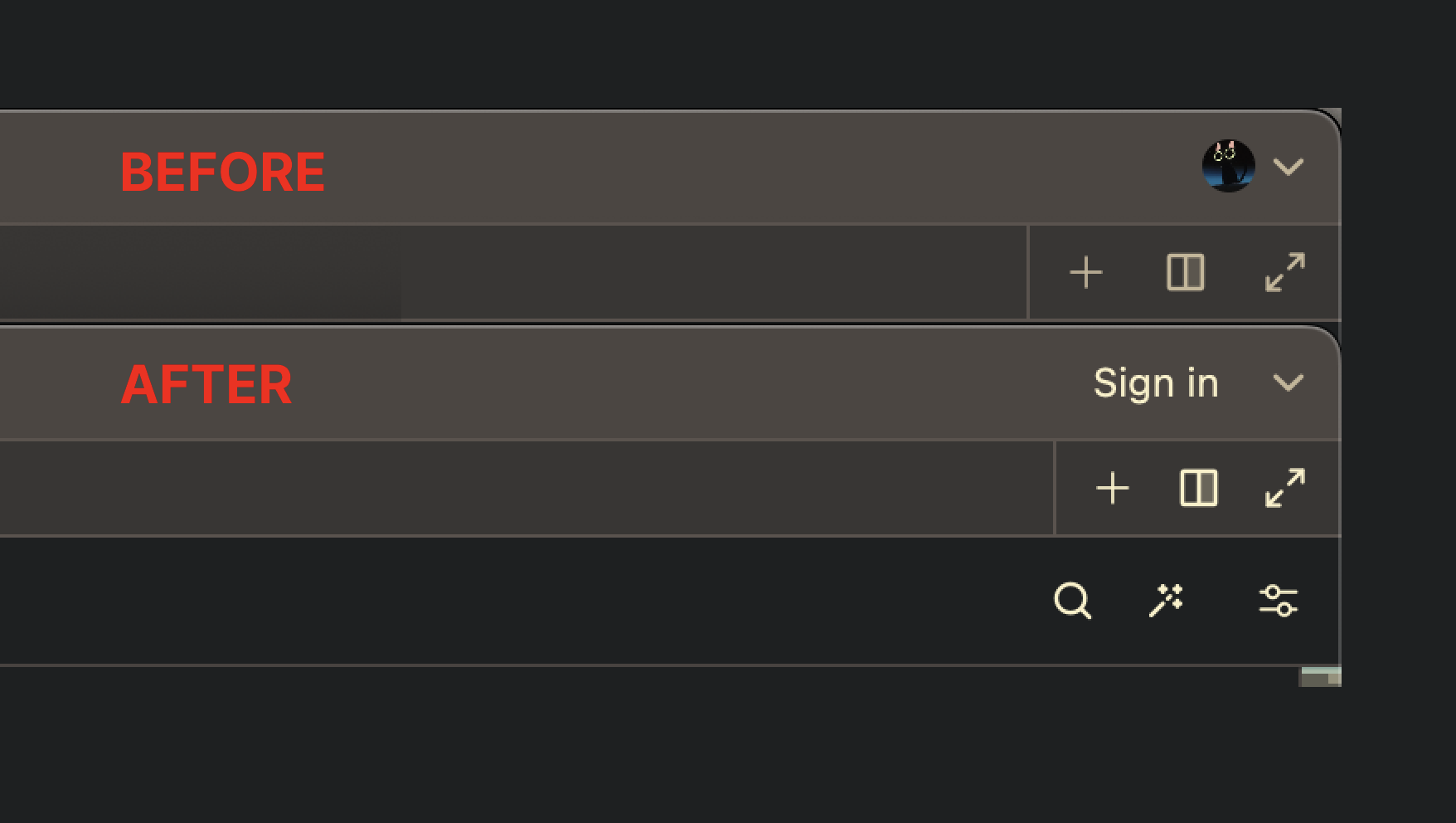
- Unifies spacing between left and right sides of the tab bar
- Use the default icon color for `end_slot` tools. This should help more
clearly differentiate when forward or backward navigation is disabled
due to the tools on the other side not looking so much like the disabled
navigation arrows.
- Rework the TabBar implementation in `pane.rs` to directly pass in
items to the `start_slot` instead of an unneeded extra horizontal
layout.
Left side:

Right side:
Release Notes:
- Standardized some Tab Bar UI elements. You many notice some slight
spacing or color changes.
This PR adds support for replacing the current preview tab when using
GoToDefinition. Previously a tab, that was navigated away from, was
converted into a permanent tab and the new tab was opened as preview.

Without `enable_preview_from_code_navigation`:


https://github.com/zed-industries/zed/assets/53836821/99840724-d6ff-4738-a9c4-ee71a0001634

With `enable_preview_from_code_navigation`:


https://github.com/zed-industries/zed/assets/53836821/8c60efcb-d597-40bf-b08b-13faf5a289b6

Note: In the future I would like to improve support for the navigation
history, because right now tabs that are not "normal" project items,
e.g. FindAllReferences cannot be reopened

Release Notes:

- Added support for replacing the current preview tab when using code
navigation (`enable_preview_from_code_navigation`)
Still TODO:

* Disable the new save-as for local projects
* Wire up sending the new path to the remote server

Release Notes:

- Added the ability to "Save-as" in remote projects

---------

Co-authored-by: Nathan <nathan@zed.dev>
Co-authored-by: Bennet <bennetbo@gmx.de>
This PR reverts #10740, as it makes it too easy to close Zed
accidentally.

Quitting Zed when you don't mean to is disruptive and can break your
flow. This is even more the case when you're collaborating.

Therefore, we shouldn't make it easy to quit Zed when you don't mean to.

If we want to bring back this behavior it needs to have a corresponding
setting that should, in my opinion, be **off** by default. Additionally,
someone made the good point that this behavior should not be present on
Linux or Windows.

This reverts commit 5102e37a5b.

Release Notes:

- Changed `cmd-w` with no open tabs to no longer close the window
(preview-only).
This is a crate only addition of a new version of the AssistantPanel.
We'll be putting this behind a feature flag while we iron out the new
experience.

Release Notes:

- N/A

---------

Co-authored-by: Nathan Sobo <nathan@zed.dev>
Co-authored-by: Antonio Scandurra <me@as-cii.com>
Co-authored-by: Conrad Irwin <conrad@zed.dev>
Co-authored-by: Marshall Bowers <elliott.codes@gmail.com>
Co-authored-by: Antonio Scandurra <antonio@zed.dev>
Co-authored-by: Nate Butler <nate@zed.dev>
Co-authored-by: Nate Butler <iamnbutler@gmail.com>
Co-authored-by: Max Brunsfeld <maxbrunsfeld@gmail.com>
Co-authored-by: Max <max@zed.dev>
I'm not a huge fan of this change (& I expect the placement to change).
The plan is to have the button in a toolbar of terminal panel, but I'm
not sure if occupying a whole line of vertical space for a single button
is worth it; I suppose we might want to put more of tasks ui inside of
that toolbar.
Release Notes:

- Removed task status indicator and added "Spawn task" action to
terminal panel context menu.
This PR includes two relevant changes:
- Platform binds (super, windows, cmd) will now parse on all platforms,
regardless of which one is being used. While very counter-intuitive
(this means that `cmd-d` will actually be triggered by `win-d` on
windows) this makes it possible to reuse keymap files across platforms
easily
- There is now a KeyContext `os == linux`, `os == macos` or `os ==
windows` available in keymaps. This allows users to specify certain
blocks of keybinds only for one OS, allowing you to minimize the amount
of keymappings that you have to re-configure for each platform.

Release Notes:

- Added `os` KeyContext, set to either `linux`, `macos` or `windows`
- Fixed keymap parsing errors when `cmd` was used on linux, `super` was
used on mac, etc.
We were effectively discarding value set by display_nav_history_buttons
once we've updated settings for a pane. This commit adds another bit of
state to display_nav_history_buttons by allowing it to hard-deny setting
updates.

Release Notes:

- Fixed a bug that caused disabled navigation buttons to show up in
terminal panel.
This introduces multiple improvements to the drop targets.
## Hitbox shape
Currently, hitboxes are rectangles, where the vertical ones reach all
the way to the ends, which reduces the space for the horizontal ones,
making the hitboxes a bit awkward in the corners. This new approach just
determines the closest side.
Visual representation:

## Hitbox size
The width of the hitbox was currently always 8 rem all around. In setups
with many columns or rows, or when the font size was very large, this
could potentially overlap the center hitbox, not allowing to drop a tab
without another split. Now the width of the hitboxes are a fraction of
the smaller size of its parents width and height. This makes sure the
hitboxes have the same width all around, but never fully block the
center hitbox.
I've also made this value configurable through the new
`drop_target_size` config which takes a `f32` fraction and is set to 0.2
by default.
Not sure if this is worth mentioning, but this technically allows to
remove the split hitboxes all together by setting it to `0.0`, or
removing the center hitbox by setting it to any value `>=0.5`. Not that
this is necessary, but it would be possible now.
## Larger visualization
The visual overlay when using one of the side hitboxes were also `8em`
wide. Since their logical size now changed, and it can't currently be
represented with GPUI (without abusing the `canvas` element), I made the
visual feedback take half of the width or height of the available space,
just like how other editors do this.
Also, the opacity/alpha value set by a theme is currently ignored. This
change now respects the themes opacity for it!
## Respect alpha value
Currently, the alpha value of `drop_target.background` is ignored. Even
the default themes set a value that is overwritten by a hard coded
value. I have removed this hard coded value and it now respects the
alpha value.
This change affects existing themes, see
https://github.com/zed-industries/zed/pull/10643#issuecomment-2059641528
## ~~No more lag while dragging over gutter~~ Extracted into #10737
~~It looks like the editor had a small optimization to drop events when
hovering the gutter. This also happens while dragging a tab over the
gutter, and causes some stuttering. Please correct me if this wasn't
just a small optimization, but I could not derive a different reason for
this code to exist.~~
Here is a video that tries to show all those changes with a before on
the left, and the after on the right:
https://github.com/zed-industries/zed/assets/1282767/f97f3420-513f-410f-a1c8-7966429ad348
Release Notes:
- Added `drop_target_size` setting. This should be a fractional percent
(e.g., `0.5`).
- Improved the hitboxes for drop targets.
- Updated drop targets to respect the alpha channel of the
`drop_target.background` color.
There was an edge case where the project panel selection would not be
updated when opening a lot of tabs quickly using the preview tab
feature.
I spent way too long debugging this, thankfully @ConradIrwin spotted it
in like 5 minutes 🎉

Release Notes:

- N/A
 Piotr Osiewicz

 Evren Senandevrensen467

 Toni CárdenasandKirill Bulatov
 Conrad Irwin
 Jeroen van Baarsen
 Suhun Han

 Thorsten BallandBennet
 Mikayla Maki


 Antonio Scandurra
 Nathan SoboandJason
 Remco Smits
 Michael Angerman
 Harsh Narayan JhaandKirill Bulatov

 Max BrunsfeldandConrad
 Marshall Bowers
 Panghu
 João Miguel NogueiraandConrad Irwin
 Robert FalkénandConrad Irwin
 Andrew LyginandMikayla
 Nate Butler
 Bennet Bo Fenner


 ElKowar
 William Viktorsson
 Philipp Schaffrath